Subbotnik (Stereo)
Description
Warning
Please be careful when using high resonance-levels of the filter
As typical for a diode-ladder filter the sound can become quite nasty, so be sure to try with low volumes first! Please note: Subbotnik does not provide true stereo processing, but the resources of this mode are needed for the filterbank in vocoder-mode. Here is a little demo-track done with Subbotnik with quite a bit of reverb added in the DAW: https://soundcloud.com/taitekatto/subbotnik-for-tbd
Subbotnik originates as a term for a volunteer workday on a Saturday in the Soviet Union, also known under that name in the former DDR / Eastern Germany. TBD-Subbotnik uses “Eastcoast” building-blocks in a more “Westcoast”/Buchla-synths inspired way. Its name is meant as a play on words, paying tribute to Morton Subotnick composer and friend of Don Buchla, famous for his composition “Silver Apples of the Moon”, using a Buchla 100, said to be the first electronic work available on record to the public.
One aspect of this way to sculpt the sounds by adding overtones is the optional cross modulation of one Macro-oscillator modulating different aspects of a second Macro-oscillator. Another more Westcoast approach is to have many random modifiers and the option to use one EG in a lowpass gate inspired fashion.
Among other things Subbotnik uses two clones of Mutable Instruments Braids and examples for the VULT-language by Carlos Laguna Ruiz, used with the filter design here. For more details on those topics please look here: https://mutable-instruments.net/modules/braids and here https://github.com/modlfo/vult
Subbotnik is an extended version of the first row of modules as prototyped in VCV Rack:
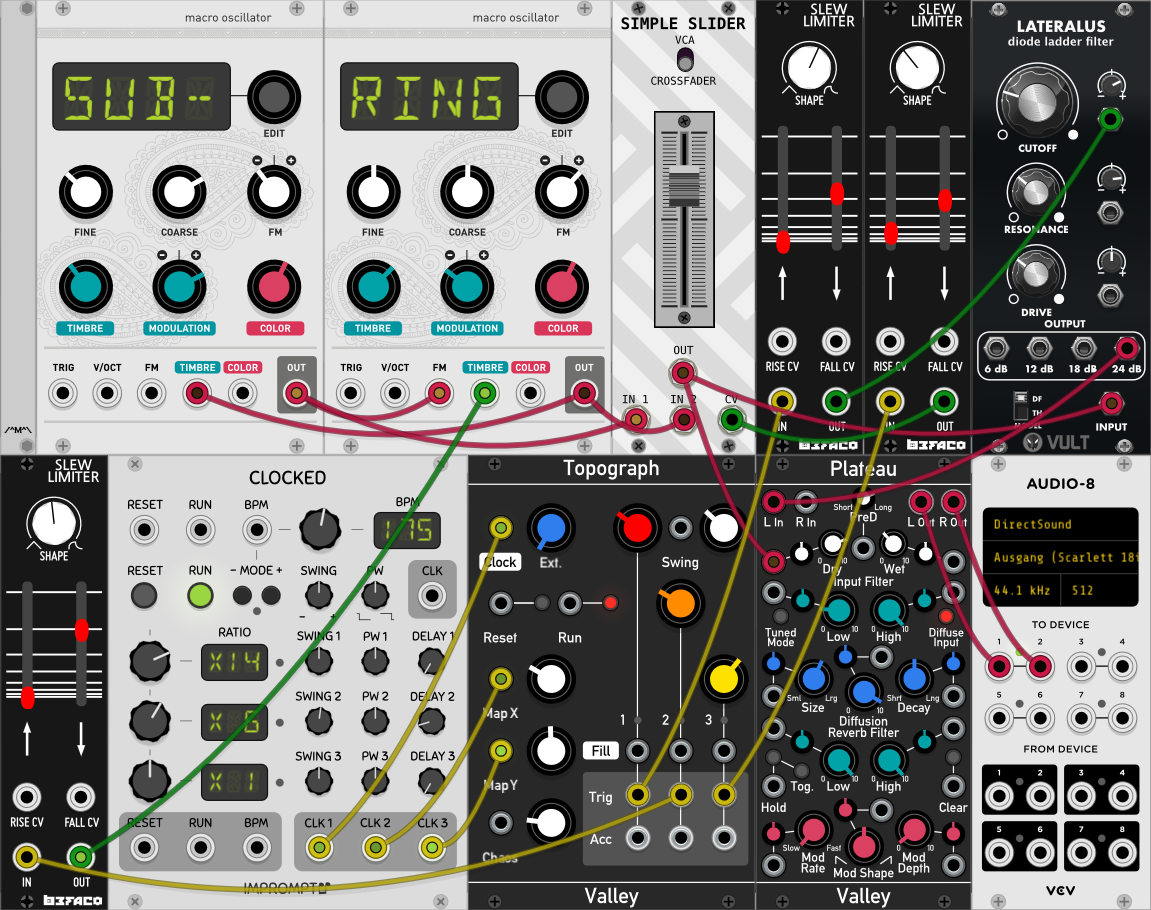
Two macro oscillators can modulate each other, but Subbotnik also offers 10 LFOs with 7 different waveforms, including S&H. These modulators can modify almost every aspect of the soundengine by using selectable destinations. 5 of those LFOs also can target time / frequency related parameters including the first 5 LFOs. It’s actually much easier to use than to explain!
Parameters
Section 1: Global
Gate Oscillators and Envelopes
Master Volume
CrossFade MacOsc A <=> MacOsc B (ID 0 for modulation destination)
Section 2: MacOsc A (incl. LFO Destinations 1-4)
Enable MacOsc A n/y
Shape A
Volume A
Coarse Pitch (V/Oct - C1:0, C1#:100…C5:60000) A
Fine Tune +- 1200 Cent A
Timbre A
Color A
Enable CrossModulation from Osc B n/y
AM xModA Amount A
Frequency xModB Factor A
Frequency xModB Amount A
Timbre xModB Amount A
Color xModB Amount A
Section 3: MacOsc B (incl. LFO Destinations 5-8)
MacOsc_B (incl. LFO Destinations 5-8)
Enable MacOsc B n/y
Shape B
Volume B
Coarse Pitch (V/Oct - C1:0, C1#:100…C5:60000) B
Fine Tune +- 1200 Cent B
Timbre B
Color B
Enable CrossModulation from Osc B n/y
AM xModA Amount B
Frequency xModA Factor B
Frequency xModA Amount B
Timbre xModA Amount B
Color xModA Amount B
Section 4: Low Pass Filter (please note: some MacOsc “Shapes” force the SVF type)
Filter enable n/y
Diode Ladder <=> State Variable Filter type
Filter Drive / Wavefolder Amount
Cutoff Frequency
Resonance
AD EG Filter amount
Section 5: AD EG (Note: for a ‘lowpass Gate’ kind of EG please set the Filter’s Cutoff Frequency and EG-amount to your liking first)
Enable AD-EG n/y
- AD-EG to Volume+Filter <=> Filter (Filter must be set
accordingly!)
Attack AD-EG
Decay AD-EG
Loop AD-EG while Gate is active n/y
Section 6: Volume ADSR EG
Enable Volume ADSR-EG n/y
Attack Volume ADSR-EG
Decay Volume ADSR-EG
Sustain Volume ADSR-EG
Release Volume ADSR-EG
Enable LFO 1 n/y
Destination LFO 1
Type LFO 1
Modulation Speed LFO 1
Modulation Intensity LFO 1
Enable LFO 2 n/y
Destination LFO 2
Type LFO 2
Modulation Speed LFO 2
Modulation Intensity LFO 2
Enable LFO 3 n/y
Destination LFO 3
Type LFO 3
Modulation Speed LFO 3
Modulation Intensity LFO 3
Enable LFO 4 n/y
Destination LFO 4
Type LFO 4
Modulation Speed LFO 4
Modulation Intensity LFO 4
Enable LFO 5 n/y
Destination LFO 5
Type LFO 5
Modulation Speed LFO 5
Modulation Intensity LFO 5
LFO++ 1 active n/y
Destination LFO++ 1
Type LFO++ 1
Modulation Speed LFO++ 1
Modulation Intensity LFO++ 1
LFO++ 2 active n/y
Destination LFO++ 2
Type LFO++ 2
Modulation Speed LFO++ 2
Modulation Intensity LFO++ 2
LFO++ 3 active n/y
Destination LFO++ 3
Type LFO++ 3
Modulation Speed LFO++ 3
Modulation Intensity LFO++ 3
LFO++ 4 active n/y
Destination LFO++ 4
Type LFO++ 4
Modulation Speed LFO++ 4
Modulation Intensity LFO++ 4
LFO++ 5 active n/y
Destination LFO++ 5
Type LFO++ 5
Modulation Speed LFO++ 5
Modulation Intensity LFO++ 5
Usage / Patch Ideas
In order to have Pitch-CV/Gate connected in a traditional way, you should assign the Gate/Trigger to “Gate” in the Global section and Pitch-CV to “Coarse Pitch A” and “Coarse Pitch B” of both Oscillator sections in parallel. This gives you 5 octaves (0-5V) of range for 60 notes / 5 octaves. But of course you could change the pitch of one oscillator “by hand” with a knob or even with the browser GUI instead.
In principle, already one of Subbotnik’s two macro-oscillators is powerful enough to serve as the soundsource of the module, because effectively it’s a clone of Mutable Instrument’s Braids. To use it as a Westcoast inspired complex oscillator any of the macro-oscillators can work as a modulator or a carrier, even at the same time. In addition the macro-oscillators’ parameters volume, pitch, timbre and color can be destinations for more traditional LFOs. The random speed modulators are somewhat inspired by the Buchla’s ‘Source of Uncertainty’ in a way that they can function as tempo-modifiers for the AD-EG and the first five LFOs. The AD-EG can be used as a filter-EG and thus behave similar to a Westcoast style lowpass gate. In loop-mode variations of the AD-EG times can lead to complex rhythmic patterns. The AD-EG can be kind of overlayed by the ADSR-EG. The loop-mode of the AD-EG will only work as long as the gate is on, looping will also retrigger the Macro-oscillators, which is important for some oscillators/soundsources, which are called shapes with Braids. (See shapes 28-36, including physical-model based ones below.)
By looking at the presets provided and given the fact that the signal-pass mainly is symbolized from top to bottom you should be able to find many useful applications of Subbotnik.
The waveforms or so-called shapes per Macro-oscillator are as follows per ID:
00 CSAW
01 MORPH
02 SAW_SQUARE
03 SINE_TRIANGLE
04 BUZZ
05 SQUARE_SUB
06 SAW_SUB
07 SQUARE_SYNC
08 SAW_SYNC
09 TRIPLE_SAW
10 TRIPLE_SQUARE
11 TRIPLE_TRIANGLE
12 TRIPLE_SINE
13 TRIPLE_RING_MOD
14 SAW_SWARM
15 SAW_COMB
16 TOY
17 DIGITAL_FILTER_LP
18 DIGITAL_FILTER_PK
19 DIGITAL_FILTER_BP
20 DIGITAL_FILTER_HP
21 VOSIM
22 VOWEL
23 VOWEL_FOF
24 HARMONICS
25 FM
26 FEEDBACK_FM
27 CHAOTIC_FEEDBACK_FM
28 PLUCKED
29 BOWED
30 BLOWN
31 FLUTED
32 STRUCK_BELL
33 STRUCK_DRUM
34 KICK
35 CYMBAL
36 SNARE
37 WAVETABLES
38 WAVE_MAP
39 WAVE_LINE
40 WAVE_PARAPHONIC
41 FILTERED_NOISE
42 TWIN_PEAKS_NOISE
43 CLOCKED_NOISE
44 GRANULAR_CLOUD
45 PARTICLE_NOISE
46 DIGITAL_MODULATION
47 QUESTION_MARK