TBD-16
Overview
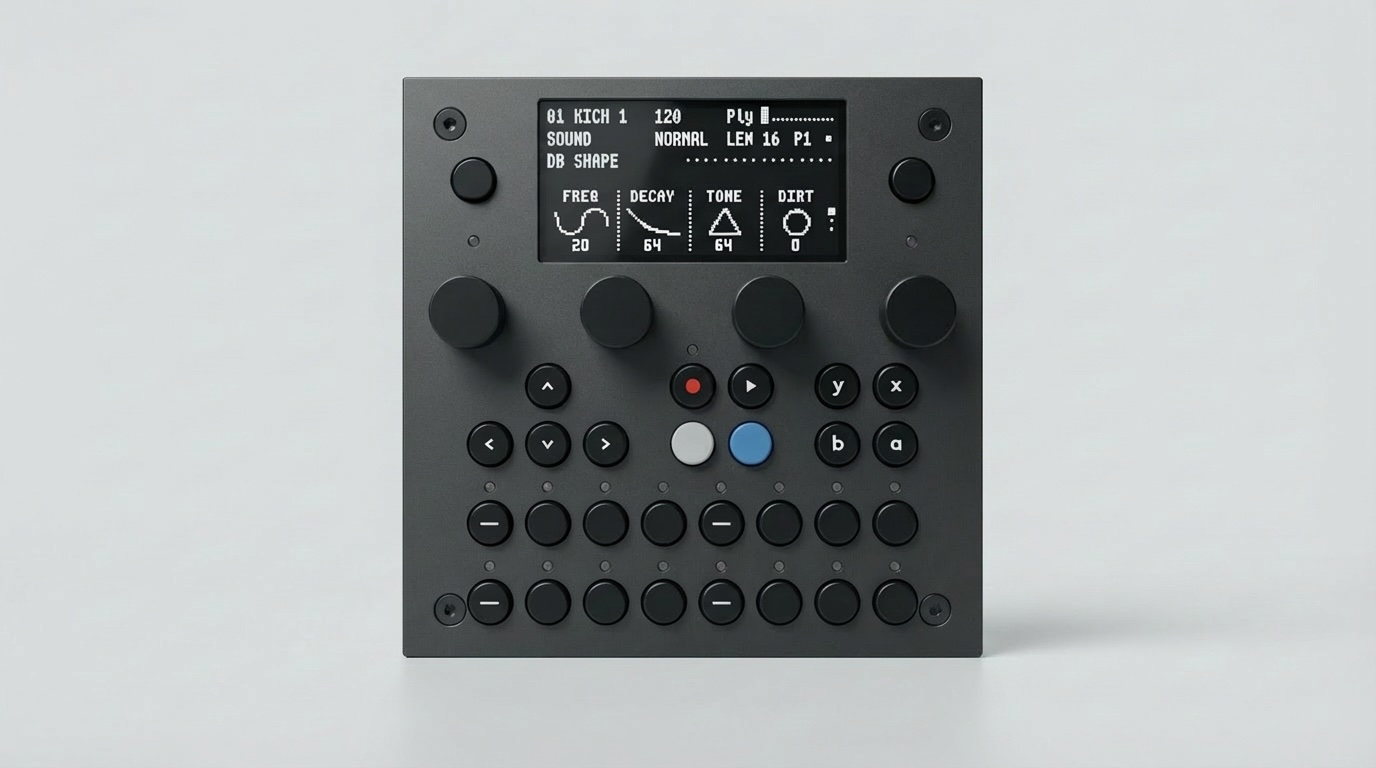
The TBD-16 is a complete desktop instrument built around the open-source CTAG TBD audio engine. Plug in power and it boots into the default Groovebox / Drum Machine firmware with 16 tracks. No computer, no Eurorack case, no setup required.
30 buttons — Transport, track select, mute, pattern controls
4 endless potentiometers (with push-switch) — 360° rotation for parameter control
2.4” OLED display — 128 × 64 px, shows track state, menus, and parameter values
19 RGB LEDs — Visual feedback for track state, sequencing, and modes
50+ DSP plugins — Synthesizers, effects, drum machines, granular engines, and more
Two independent channels — Run any two plugins simultaneously
Portable — Works with any USB power bank; an optional power bank mount clips on the back
Open source — Write plugins in C++, test in the simulator, flash to hardware
Technical Specifications
Processors |
ESP32-P4 (DSP) · RP2350B (UI/MIDI) · ESP32-C6 (WiFi) — see Processors section |
Audio Codec |
TLV320AIC3254 — Stereo 24-bit ADC/DAC with embedded miniDSP |
Sample Rate |
44.1 kHz (firmware default; codec supports 8–192 kHz) |
Bit Depth |
32-bit I2S bus · 32-bit float internal processing |
Processing Buffer |
32 stereo frames (0.73 ms per buffer at 44.1 kHz) |
DAC SNR |
> 110 dB (A-weighted, measured) |
DAC THD+N |
0.018 % / −75 dB (1 kHz, 0 dBV, measured) |
ADC SNR |
93 dB typical (codec datasheet) |
Channel Separation |
−83 dB (measured) |
Audio I/O |
Stereo line in · stereo line out · headphone out (all TRS 3.5 mm) |
MIDI |
2× TRS In (Type-A) · 2× TRS Out · USB MIDI · USB Host MIDI |
USB Ports |
3× USB-C · 1× USB-A Host |
Wireless |
WiFi (ESP32-C6) · Ableton Link |
Storage |
2× micro SD (P4 + RP2350) |
Display |
2.4” OLED, 128 × 64 px |
Controls |
30 buttons · 4 endless pots (with push-switch) · volume wheel |
LEDs |
19 RGB LEDs |
Power |
USB-C (5 V) — works with any USB power bank or adapter |
Dimensions |
Coming soon |
Weight |
Coming soon |
Processors
Chip |
Role |
Core |
Key Specs |
|---|---|---|---|
DSP Engine |
Dual RISC-V @ 400 MHz |
32 MB stacked PSRAM · 16 MB Flash · AI/vector instructions · USB 2.0 OTG |
|
UI / MIDI |
Dual Arm Cortex-M33 @ 150 MHz |
520 KB SRAM · 48 GPIO · 8× 12-bit ADC · 12× PIO state machines · FPU + DSP · TrustZone + TRNG |
|
ESP32-C6 |
WiFi |
Single RISC-V |
WiFi 6 (802.11ax) · Bluetooth 5 · managed by the P4 |
The P4 and RP2350B communicate via SPI. The RP2350B handles all UI input and MIDI and forwards control data to the P4; the P4 runs audio processing and sends status and Ableton Link data back.
Connectivity
Audio
Stereo line input (TRS 3.5 mm)
Stereo line output (TRS 3.5 mm)
Stereo headphone output (TRS 3.5 mm) with volume wheel
Audio Performance
The TBD-16 uses the TLV320AIC3254 stereo audio codec from Texas Instruments. Below is a summary of the hardware capabilities and the firmware defaults, followed by measured performance data.
Hardware vs. firmware defaults
Parameter |
Hardware Capability |
Firmware Default |
|---|---|---|
Sample rate |
8 kHz – 192 kHz |
44.1 kHz |
I2S word length |
16 / 20 / 24 / 32 bit |
32 bit |
Internal processing |
— |
32-bit float |
MCLK |
— |
256 × fs = 11.29 MHz (Audio PLL) |
DAC oversampling (DOSR) |
— |
128 |
ADC oversampling (AOSR) |
— |
128 |
Processing buffer |
— |
32 stereo frames (0.73 ms) |
DMA buffering |
— |
4 × 32 frames (2.9 ms) |
PLL |
Available |
Disabled (direct MCLK clocking) |
ADC high-pass filter |
Programmable IIR |
First-order IIR at ~3.7 Hz (DC blocking) |
Measured performance (line output, DAC only)
Measured with a MOTU UltraLite AVB reference interface and ARTA spectrum analyzer software. Test signal: 1 kHz sine (SineSrc plugin), output level calibrated to 0 dBV (1 Vrms , full scale).
Parameter |
Left Channel |
Right Channel |
|---|---|---|
THD+N (1 kHz, 0 dBV) |
0.018 % |
0.023 % |
SNR to first harmonic |
~80 dB |
~78 dB |
SNR to noise floor |
> 110 dB |
> 110 dB |
Noise floor (DAC muted) |
> 120 dB |
> 120 dB |
Channel separation |
−83 dB |
−83 dB |
Codec datasheet ratings (for reference, TI test conditions)
Parameter |
Path |
Typical |
Min |
|---|---|---|---|
DAC SNR (A-weighted) |
Line out |
100 dB |
87 dB |
DAC Dynamic Range |
Line out |
100 dB |
— |
DAC THD+N |
Line out |
−83 dB |
−70 dB |
DAC SNR (A-weighted) |
Headphone out |
100 dB |
87 dB |
DAC Mute Attenuation |
Line out |
119 dB |
— |
ADC SNR (A-weighted) |
Single-ended |
93 dB |
80 dB |
ADC Dynamic Range |
Single-ended |
92 dB |
— |
ADC THD+N |
Single-ended |
−85 dB |
−70 dB |
Full electrical characteristics are in the TLV320AIC3254 datasheet.
MIDI
All connections follow the TRS Type-A standard — no adapters or special cables needed.
Connection |
Details |
|---|---|
TRS MIDI In 1 |
TRS 3.5 mm Type-A input for keyboards, sequencers, and controllers |
TRS MIDI In 2 / Clock |
Second TRS 3.5 mm Type-A input; doubles as Clock/Reset input for Eurorack and modular sync (use a 3.5 mm splitter cable for separate Clock and Reset). Note: Analog Clock/Reset requires toggling the switch on the bottom of the case. |
TRS MIDI Out 1 |
TRS 3.5 mm Type-A output for sending MIDI to external gear |
TRS MIDI Out 2 |
Second TRS 3.5 mm Type-A output |
USB MIDI |
Class-compliant USB MIDI via USB-C #1 (no drivers required on any OS) |
USB Host MIDI |
Connect MIDI controllers directly via USB-A Host Port |
MIDI is processed by the RP2350 front-end processor. External MIDI messages (TRS or USB) are received by the RP2350 and forwarded to the ESP32-P4, where plugins can respond to Note On/Off, Control Change, Pitch Bend, Program Change, and Clock messages. The RP2350 also runs its own generators, sequencers, and arpeggiators that control plugins via the SPI bus.
Tip
For wireless tempo sync without MIDI cables, use Ableton Link instead of MIDI clock.
USB
Port |
Function |
|---|---|
USB-C #1 |
ESP32-P4 Device (High Speed): USB MIDI, USB Network (web interface without WiFi), firmware flashing via JTAG |
USB-C #2 |
Additional power and/or RP2350 Device |
USB-C #3 |
ESP32-P4 JTAG (front panel) |
USB-A |
USB Host Port for MIDI controllers and other USB peripherals |
WiFi
Configuration and preset management interface via ESP32-C6. See WiFi & Ableton Link.
SD Cards
Two slots: P4 (config, samples, web UI) + RP2350 (firmware images, user data). See Storage & Samples.
Assets
Downloadable assets (datasheet, mechanical drawings) will be published here as they become available.
Getting Started
Your TBD-16 ships ready to use:
Using Your TBD-16 — Plug in power and start making music
WiFi & Ableton Link — Set up WiFi, web interface, and Link
Storage & Samples — Manage SD card content
Flash & Updates — Update firmware from your browser