Retroactor (Stereo)
Description
Warning
Please be careful when using high resonance-levels of the filter or high feedback-levels.**
As typical for a diode-ladder filter and feedback-experiments the sound can become quite nasty, so be sure to try with low volumes first! Please note: Retroactor does not offer real stereo processing but the feedback processing needs many resources, so it still takes up both slots of the TBD. Here is a little demo-track done only with Retroactor with quite a bit of reverb added in the DAW: https://soundcloud.com/taitekatto/retroactor-for-tbd
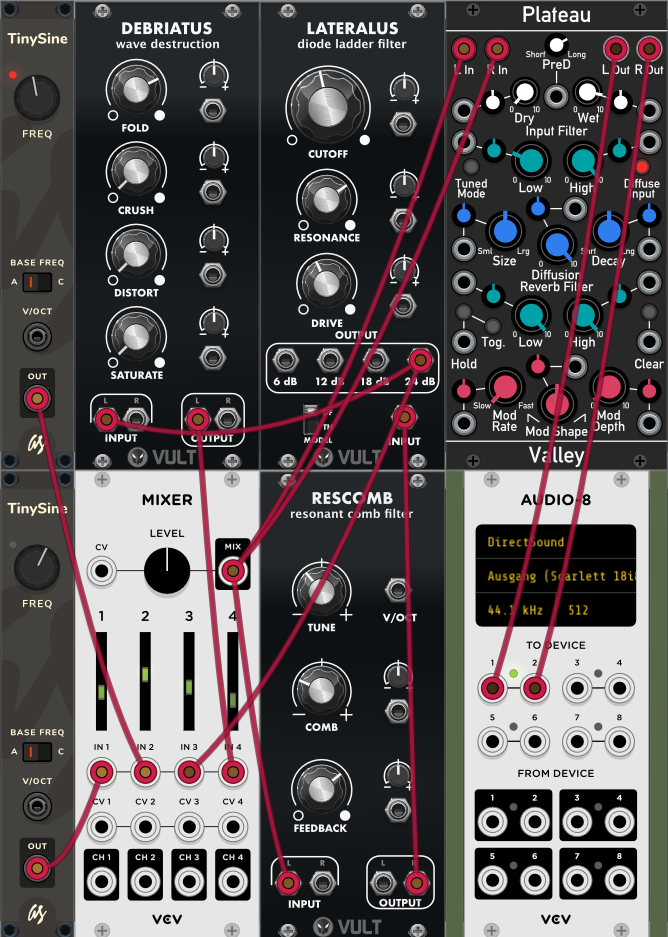
The idea of Retroactor is to have a simple yet flexible to control feedback / drone-noise generator.The plugin uses a wavefolder, as diode-ladder filter and a resonant combfilter by Carlos Laguna Ruiz implemented in his VULT language, for more details on the topic please look here: https://github.com/modlfo/vult Retroactor’s signal-flow is visualized downwards from the top to the bottom of the GUI. Because of the feedback structure this yet may be not entirely obvious. Here is a screenshot of a very similar patch, also using VULT-technology, done in VCV Rack to make it more obvious:
Parameters
Section 1: Global
Master Pitch (map CV here if desired)
Master Tune +- 1200 Cent
Master Volume
Section 2: Voice
- Pitch smooth Sine A (Sine A is a pure Sine, very smooth - for
overtones consider Sine B)
Smooth Sine A +-1 Octave
- Distort Sine B n/y (This will give you a Sine wave with more
overtones due to aliasing)
- Pitch variable Sine B (Sine B can be rougher, beware of
unwanted scratchy sounds, though)
Variable Sine B +-1 Octave
Section 3: Feedback Loop
- ResetFeedbackLoop (Click here, if the feedback has stopped and
you want to restart it)
Combfilter Cutoff
Combfilter Resonance
Combfilter Tone
Diode Ladder Cutoff
Diode Ladder Resonance
Vintage Resonance pitching n/y
Wavefolder Amount
- Isolate Feedback-Loop n/y (Sinewaves will be excluded from the
feedback-line)
Section 4: Mixer
Disable Sinus Waves n/y (Shut off sinewaves)
- VolSineBoost (Decrease or up to triple loudness increase the
volume of the waves)
- Vol smooth Sine A (Sine A is a pure Sine, very smooth - for
overtones distort Sine B)
- Vol variable Sine B (Sine B can be rougher, beware of unwanted
scratchy sounds, though)
Sinewaves Mix
Vol Feedback Loop
Vol Wavefolder
Usage / Patch Ideas
Please note that if you want to make use of Retroactor’s feedback capabilities you have to feed the feedback-loop with some kind of signal (sine waves and/or filter-feedback) first.
The general idea here is, then to find some “sweet spots” where the feedback and the distortion sounds interesting and then play around with some parameters in a way that makes sense in the (musical) context you want to use it. It’s a good idea to use lots of reverb and maybe also echo and/or some kind of modulation like a phaser. In the VCV Rack screenshot above for instance, the module Plateau got used.