dada tbd/docs
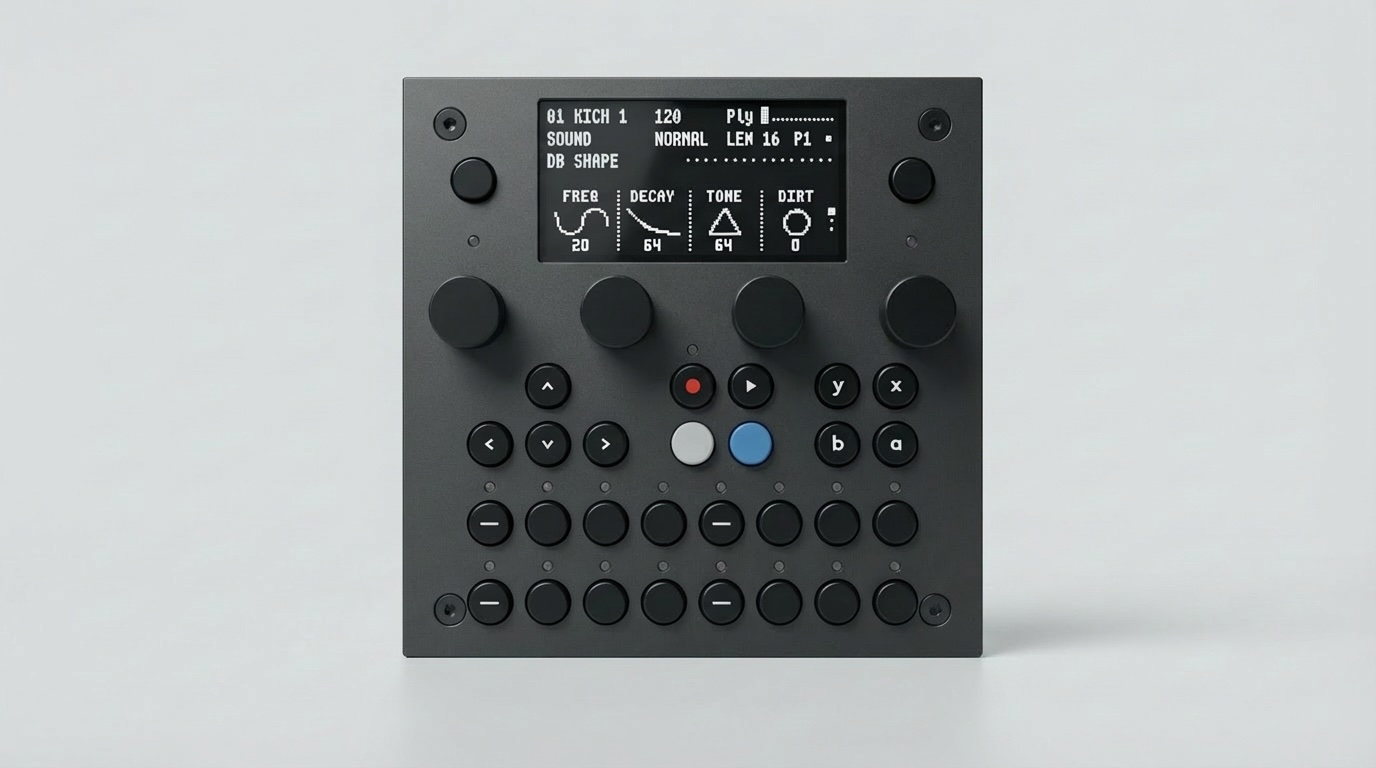
The open audio platform
for musicians and developers.
The dadamachines TBD-16 is a standalone desktop instrument built on CTAG TBD, an open-source audio DSP engine. It combines 50+ synthesizers and effects with standard MIDI, a browser-based UI, and Ableton Link. Plug in power and start making music — no computer required.
An instrument you can truly make your own.
Most electronic instruments are closed boxes — you get the sounds the manufacturer chose, and that's it. TBD is different. The DSP engine, firmware, and plugin system are fully open source (GPL 3.0). You can play it out of the box, or dive into the code and shape it into exactly the instrument you need.
Ready to Play
Ships as a complete instrument. Plug in USB-C power, connect speakers, and you're making music in seconds.
Open-Source Software
The DSP engine, sound processors, macro/preset & rack layer, tools and simulator are GPL 3.0 — full source access; study, modify, contribute. (The WebUI is a dadamachines proprietary app talking to the firmware over its REST API.)
No Lock-In
Standard MIDI, standard audio jacks, SD card storage. Your instruments and sounds belong to you.
Built on CTAG TBD
The audio engine and 50+ plugins come from the CTAG TBD project by Robert Manzke.
Multicore architecture. Three processors, one open platform.
The TBD-16 runs three purpose-built processors in parallel: the ESP32-P4 (dual-core RISC-V) handles real-time audio DSP, the RP2350 (dual-core ARM/RISC-V) drives the hardware UI, MIDI, and sequencing, and the ESP32-C6 manages WiFi & Ableton Link. Each layer is independently programmable — change one without touching the others.
Controller Apps
Build MIDI controllers, sequencers, or control surfaces on the RP2350 using Arduino & PlatformIO.
DSP Plugins
Write audio code in C++ that runs on the ESP32-P4. Test in the desktop simulator before flashing to hardware.
Web UI
Built-in WiFi serves a web interface for preset management, plugin configuration, and firmware updates.
Ableton Link
Wireless tempo sync with Ableton Live, iOS apps, and any Link-enabled device on the same network.
Jump in wherever you are.
Whether you're a musician, a developer, or both — there's a path for you.
Make Music
Your TBD-16 ships ready to use. Switch apps, tweak 50+ DSP plugins from your browser, sync with Ableton Link.
Build Controller Apps
Create custom MIDI controllers, sequencers, or control surfaces on the RP2350 — Arduino & PlatformIO. No audio programming required.
Write DSP Plugins
Write audio code in C++ for the ESP32-P4. If you already ship VST, AU, or LV2 plugins, the workflow is familiar — start in the desktop simulator, no hardware needed, then flash to the device.
Hardware & Platform
The TBD-16 Devkit ships with 50+ plugins and full multi-app support. Products built on the platform can run the same broad palette or focus on a single dedicated plugin — the architecture supports both.
Shape the platform.
TBD is built by a growing community of developers, musicians, and manufacturers. Here's how you can contribute.
Contribute a Plugin
Write a synthesizer, effect, or drum machine in C++. Test it in the desktop simulator, then submit a pull request.
Create a Plugin →Build an App
Create a MIDI controller, sequencer, or performance app for the RP2350 — Arduino & PlatformIO, no audio code needed.
App Dev Guide →Build Your Own Hardware Product
Already shipping VST, AU, or LV2 plugins? Your C++ DSP code can run on TBD hardware. Use the TBD-Core module or work with dadamachines on a fully custom PCB integration. Your product can focus on a single signature sound, offer a curated collection, or ship the full multi-plugin TBD experience — same open engine, your hardware, your brand.
Talk to dadamachines →